

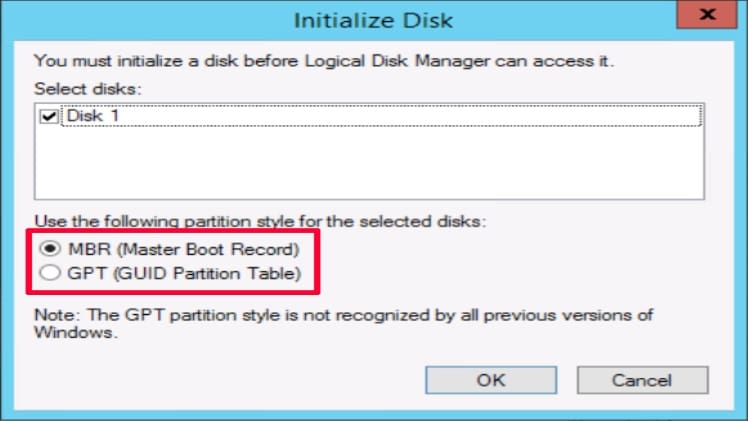
When it comes to computer storage, there are two main partitioning schemes that you may encounter: MBR (Master Boot Record) and GPT (GUID Partition Table). Understanding the differences between these two systems is important for determining which is the best option for your computer. This article will explain the differences between the two, and provide guidance on which one you should initialize.
Understanding MBR and GPT
MBR (Master Boot Record) is an older partitioning system that is used to store information about the partitions of a hard disk. It is typically stored in the first sector of the hard disk, and is used to boot the computer. MBR is limited to storing up to four partitions on a hard disk, and is limited to a maximum size of 2TB.
GPT (GUID Partition Table) is a newer partitioning system that is used to store information about the partitions of a hard disk. It is typically stored in the first sector of the hard disk, and is used to boot the computer. GPT is not limited to four partitions, and can support disks up to 8TB in size.
Deciding Which to Initialize
When deciding which system to initialize, it is important to consider the size of the hard disk, as well as the type of data you will be storing. If you are using a hard disk that is larger than 2TB, then GPT is the only option, as MBR cannot support disks larger than 2TB. If you are using a hard disk that is smaller than 2TB, then you can choose between MBR and GPT.
If you are storing data that is sensitive or important, then GPT is the better option, as it offers better data protection and reliability. If you are storing data that is not as important, then MBR may be the better option, as it is an older system and may be more compatible with older systems.
When it comes to initializing your hard disk, it is important to consider the size of the disk and the type of data you will be storing. MBR is limited to 2TB, and is not suitable for storing sensitive data. GPT is not limited in size, and offers better data protection and reliability. Ultimately, the choice between MBR and GPT depends on your individual needs.